
A notebook runs successfully for months, then fails on an import despite no application deployment. Managed compute removes infrastructure work; it does not automatically make an application's dependencies explicit or its execution environment reproducible.
At NexOps, we've seen the value of treating deployment as a platform concern: our verified work at Schiphol includes Databricks Asset Bundles adoption and Terraform inner sourcing across teams. We apply the same principle to dependencies: application requirements belong in reviewed release artefacts, not in assumptions about the current runtime.
In this post, we'll separate a reported serverless failure from verified product behaviour, then build a reproducibility playbook. The aim is to make missing dependencies detectable before production and environment changes reviewable without pretending that managed infrastructure is immutable.
The Problem
A 30 September Databricks community report about a missing serverless dependency describes a notebook that had worked for months and then failed because chardet could not be imported. The author attributes the failure to serverless environment version 6 dropping the package and an unpinned notebook following a changing default.
That attribution is reported behaviour, not a verified release record. The supplied report does not establish the package manifest, the environment-selection mechanism, the supported cloud scope, or whether a removal was documented elsewhere.
We should not turn this into an announcement that Databricks removed a particular package. We can, however, identify the engineering risk: if application code requires a package but the release does not declare it, its presence is an undocumented dependency.
For an Azure platform, start with the official Azure Databricks documentation. Establish whether environment selection applies to the specific notebook or job execution path, how dependencies are supplied, and what support or retirement conditions apply.
Until those checks are complete, environment pinning is a control to investigate—not a promise that an old environment remains available indefinitely. The playbook below deliberately avoids unverified Databricks configuration syntax.
Why It Matters for Platform Teams
The important boundary is between infrastructure ownership and application dependency ownership. A provider can manage compute while the application team remains responsible for declaring what its code imports.
A Git commit alone is therefore an incomplete release identifier. We want the application revision, dependency contract, approved artefact sources, selected environment configuration and execution evidence to travel together.
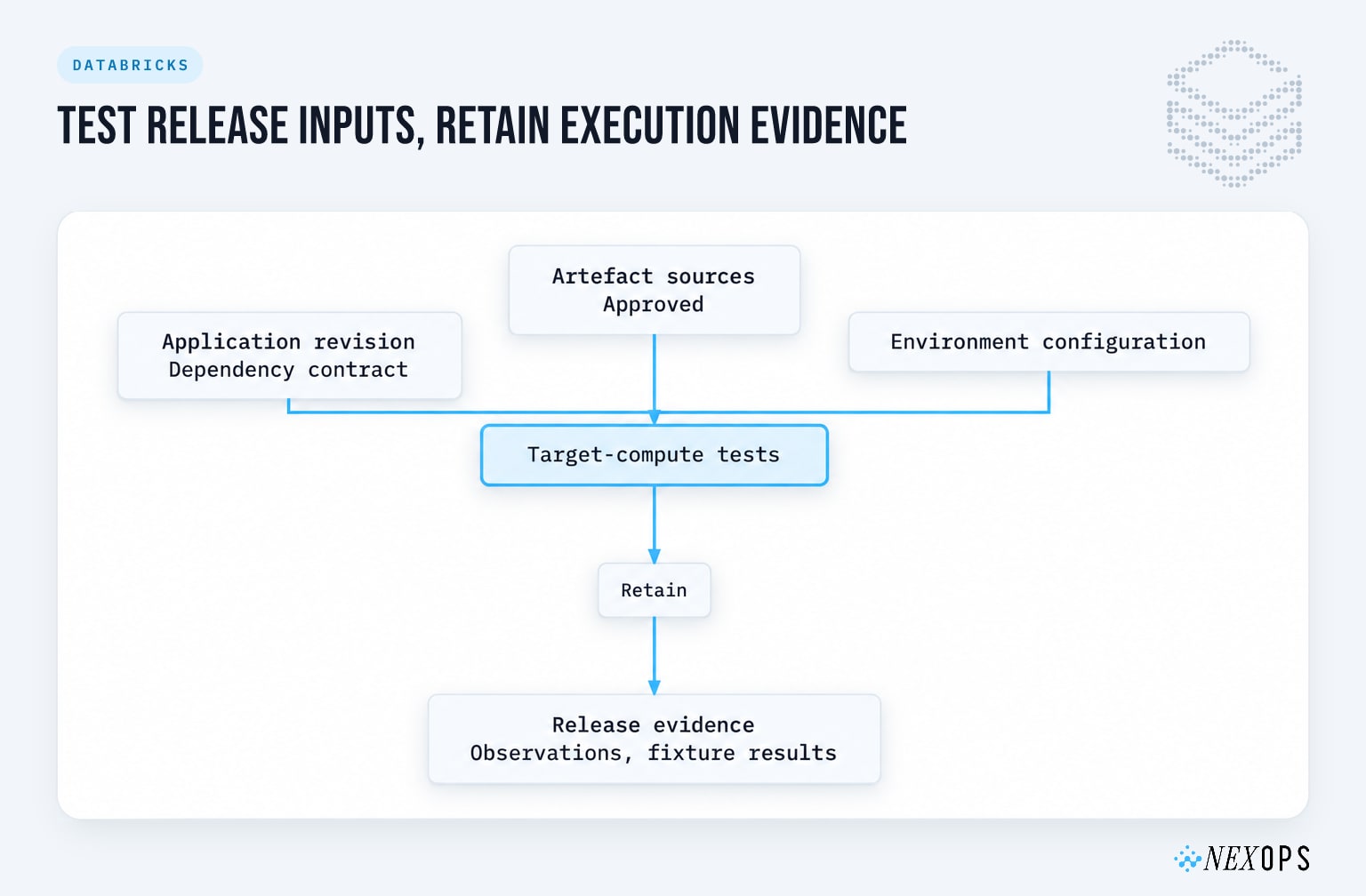
These controls address different risks. None establishes complete reproducibility on its own.
| Control | What it addresses | What it does not establish |
|---|---|---|
| Explicit dependency declarations | Packages required by application code | Compatibility with every underlying environment |
| Exact package versions and controlled artefacts | Accidental dependency-resolution changes | Control over the managed operating system or service |
| Target-compute smoke tests | Import and functional failures on the tested execution path | Correctness for every input and future platform change |
Our position is that reproducibility is a release discipline, not a checkbox. Exact direct-package versions help, but they do not freeze native libraries, installation sources, transitive dependencies or provider-managed components.
We covered the wider release boundary in our serverless upgrade dependency guide. Here, the narrower concern is making the Python dependency contract executable—and detecting when the actual environment diverges from it.
Use Case: An Undeclared Encoding Dependency in Logistics Ingestion
Consider a hypothetical logistics organisation with operational data split between on-premises systems and Azure. Supplier files arrive through an Azure landing area, and a Databricks ingestion notebook converts them into Delta tables for reconciliation with on-premises shipment records.
Peak-season volumes put pressure on the batch window, leaving little time for manual recovery. The ingestion code uses chardet to help interpret incoming file encodings, but its dependency declaration omits that package because it was already available during development.
The usual approach breaks because a successful import is treated as evidence of a supported application dependency. A source-code diff cannot explain an environment change, and installing the package interactively creates a repair that may not survive a fresh execution context.
Applying the playbook means creating a reviewed dependency contract and installing those requirements through the supported configuration for that workload. The data flow remains Azure landing storage to the ingestion notebook to Delta tables; CI adds a test execution using sanitised supplier fixtures before production promotion.
We would measure missing-module failures, dependency-related retries, time to diagnose an environment mismatch and time to restore a tested release. We would also track whether releases retain an environment observation and fixture-test result, rather than claiming that a single successful import proves reproducibility.
Implementation
1. Inventory application requirements, not the whole environment
Start with imports in the production entry point and its shared libraries. Identify which dependencies are direct requirements, which arrive transitively, and which are supplied by the execution environment.
Do not turn the entire installed-package inventory into an application requirements file. That can accidentally make provider-owned packages your responsibility and create conflicts that the application never needed.
For each direct dependency, record why it is required, who owns its upgrade decision and where its artefact comes from. If application code imports a package directly, declare it directly rather than relying on another package to bring it along.
Use a complete environment inventory as diagnostic evidence, but keep it separate from the application dependency declaration. Inventory describes what happened to be present; a contract describes what the application requires.
2. Establish a reviewed dependency contract
Use a known-good execution as a starting point, not as automatic approval. Inspect the versions, test representative inputs and resolve the dependency set before accepting it into the release.
The following Python script captures versions for explicitly selected direct dependencies. It produces a repository-owned contract, not a Databricks configuration file.
import json
from importlib.metadata import version
from pathlib import Path

# Maintain this list from application imports, not the base environment.
direct_dependencies = ["chardet"]

contract = {
    "approved_versions": {
        name: version(name)
        for name in direct_dependencies
    }
}

Path("dependency-contract.json").write_text(
    json.dumps(contract, indent=2, sort_keys=True) + "\n",
    encoding="utf-8",
)
Run this only in an execution that has passed the relevant functional checks, then review the generated file. Capturing the installed version records an observation; approval still requires a deliberate decision.
The resulting file is also not an installer. Translate the approved requirements into the supported dependency mechanism for the target workload, including an explicit package version rather than an unconstrained package name.
For this implementation, we choose an Azure Databricks Standard CPU serverless notebook job with an explicit job-level environment. The task references that environment through environment_key, overriding the notebook’s own environment configuration. The environment specification’s dependencies field accepts requirements-file-compatible entries, including exact package requirements.
If our review and testing approve chardet 4.0.0, the environment specification can declare:
spec:
  environment_version: "5"
  dependencies:
    - chardet==4.0.0
This is a fragment of the documented Jobs environment specification, not a complete deployment file. Version 5 and chardet 4.0.0 appear in the reviewed Azure documentation; we still need to confirm environment availability in the target workspace and complete compatibility and security review. Selecting an environment version does not freeze the provider-managed serverless runtime.
Keep the formats distinct: dependency-contract.json is our application approval artefact, not a documented serverless configuration format. We translate its approved requirements into the job’s environments configuration and reference that environment from the task.
The supported mechanisms are described in Configure the serverless environment and the Jobs API schema.
For stronger package reproducibility, retain the tested dependency resolution and use trusted artefact sources. Where your installation path supports it, validate package hashes; otherwise retain provenance and verify what was installed rather than assuming that a version string fully identifies every artefact.
3. Test imports and behaviour on the target compute
A local CI environment is useful for fast feedback, but it cannot certify a managed execution environment. Run the dependency smoke test through the same workload type and dependency configuration that production will use.
This example validates the approved distribution version, imports the module and exercises a small encoding fixture. It also writes an observed environment record before checking the contract, so a version mismatch leaves useful evidence.
import json
import platform
from importlib.metadata import PackageNotFoundError, version
from pathlib import Path

contract = json.loads(
    Path("dependency-contract.json").read_text(encoding="utf-8")
)
approved = contract["approved_versions"]


def installed_version(name):
    try:
        return version(name)
    except PackageNotFoundError:
        return None


observed = {
    "python_version": platform.python_version(),
    "distributions": {
        name: installed_version(name)
        for name in approved
    },
}

# This is a process-level observation, not a complete managed-image identity.
Path("dependency-observation.json").write_text(
    json.dumps(observed, indent=2, sort_keys=True) + "\n",
    encoding="utf-8",
)

mismatches = {
    name: {
        "approved": expected,
        "observed": observed["distributions"][name],
    }
    for name, expected in approved.items()
    if observed["distributions"][name] != expected
}
if mismatches:
    raise RuntimeError(f"Dependency contract mismatch: {mismatches}")

# Distribution metadata alone does not prove that a module can be imported.
import chardet

fixture = b"shipment_id,city\nA17,Amersfoort\n"
result = chardet.detect(fixture)
encoding = result.get("encoding")
if not encoding:
    raise RuntimeError("Encoding detector returned no usable encoding")

decoded = fixture.decode(encoding)
expected_text = "shipment_id,city\nA17,Amersfoort\n"
if decoded != expected_text:
    raise RuntimeError("Encoding fixture produced unexpected text")
The fixture tests behaviour beyond a bare import, but its ASCII content does not exercise difficult encoding decisions. Add sanitised examples of non-ASCII text, supported supplier encodings and malformed files, then validate downstream parsing as well.
Supply dependency-contract.json alongside the test and retain the observation through your established artefact-collection path, including when the test fails. Do not treat its local file location as durable CI evidence without confirming collection.
Also record the deployed environment selection outside this Python snapshot. The interpreter version is useful evidence, but it is not a substitute for the service configuration that selected the environment.
4. Make environment selection explicit across DTAP
Where the workload supports environment-version selection, choose an explicit supported version and review changes to it like application changes. First verify what the selector controls: a selected version must not be assumed to freeze every managed component.
Keep application configuration separate from the observed runtime state. The desired configuration says what you requested; test evidence says what actually executed.
For our Azure implementation, we use a Standard CPU serverless notebook job with an explicit job-level environment. The task’s environment_key references an entry in the job’s environments list and overrides the notebook’s own environment configuration. The Azure serverless dependency documentation, Jobs schema and bundle examples document this configuration; the environment specification uses environment_version and dependencies, not the superseded client field.
This example selects environment version 5 and declares chardet==4.0.0, which appears in the version 5 Standard package manifest. We still need compatibility and security review before approving that dependency. Selecting the client environment does not freeze the independently upgraded serverless runtime or prevent supported-version security updates.
Save the smoke-test notebook as src/dependency_smoke.py and the approved contract as dependency-contract.json. For this example, the contract must approve chardet version 4.0.0. The notebook must accept the contract_path, evidence_dir and requested_environment_version widgets, read the supplied contract and write dependency-observation.json into the supplied evidence directory. Write the observation in a finally block for ordinary Python failures, without suppressing the exception. The requested version is configuration evidence, not an independently discovered runtime identity.
Use this databricks.yml:
bundle:
  name: serverless-dependency-check

variables:
  evidence_root:
    description: Existing Unity Catalog volume directory for evidence
  environment_version:
    description: Reviewed serverless client environment version
    default: "5"

sync:
  include:
    - dependency-contract.json
    - src/dependency_smoke.py

resources:
  jobs:
    dependency_smoke:
      name: dependency-smoke-${bundle.target}
      tasks:
        - task_key: dependency_smoke
          environment_key: approved_python
          notebook_task:
            notebook_path: ./src/dependency_smoke.py
            base_parameters:
              contract_path: ${workspace.file_path}/dependency-contract.json
              evidence_dir: ${var.evidence_root}/{{job.run_id}}
              requested_environment_version: ${var.environment_version}
      environments:
        - environment_key: approved_python
          spec:
            environment_version: ${var.environment_version}
            dependencies:
              - chardet==4.0.0

targets:
  dev: {}
  test: {}
  acceptance: {}
  prod: {}
No cluster configuration is supplied, so this notebook job uses serverless compute. Keep the contract and deployment requirement consistent; CI should reject a release when they disagree.
Before deployment, authenticate the CLI against the intended Azure workspace, confirm serverless jobs and the selected environment version are available, and provision the evidence volume. The execution identity needs the required catalog, schema and volume privileges to write evidence; the collection identity needs permission to read it. Pin the CLI version in CI.
The documented bundle commands validate, deploy and execute the job by resource key. Replace the placeholder below with an existing volume directory, and use your established CLI profile or authentication configuration to select the workspace:
export DATABRICKS_BUNDLE_VAR_evidence_root="<existing-/Volumes/catalog/schema/volume/directory>"

databricks bundle validate -t test
databricks bundle deploy -t test
databricks bundle run -t test dependency_smoke
For evidence collection, record the parent job run ID from the execution result or Jobs UI and wait for a terminal state. The Jobs CLI provides run metadata, task output and deployed job settings:
mkdir -p artifacts

# Set RUN_ID to the parent job run ID.
databricks jobs get-run "$RUN_ID" --output json \
  > artifacts/job-run.json

# Set TASK_RUN_ID from the tasks array in job-run.json.
# Use the task run ID, not the parent multi-task job run ID.
databricks jobs get-run-output "$TASK_RUN_ID" --output json \
  > artifacts/task-output.json

# Set JOB_ID from the job run metadata.
databricks jobs get "$JOB_ID" --output json \
  > artifacts/deployed-job.json

databricks fs cp \
  "dbfs:${DATABRICKS_BUNDLE_VAR_evidence_root}/${RUN_ID}/dependency-observation.json" \
  artifacts/dependency-observation.json
The filesystem CLI requires the dbfs:/Volumes/... form for volume paths; this does not mean storing evidence in the deprecated DBFS root.
Run collection in CI’s always/finally stage, including when execution fails. Dependency setup can fail before the notebook starts, and process termination or storage permissions can prevent its observation from being written. Retain run metadata and task error output regardless, and treat missing evidence as a failed promotion gate.
Export the collected files, approved contract, application commit and bundle configuration to our retained release-artefact store. Keep the deployed Jobs settings alongside the observation so we can distinguish the configured environment from what the test observed. Jobs output is not a complete log archive, and run records are automatically removed after 60 days; neither Jobs history nor a local CI directory is permanent release evidence.
Use the same approved dependency artefacts across development, test, acceptance and production (DTAP) wherever possible. The promotion model should make each environment's evidence requirement explicit.
| Environment | Dependency and environment policy | Required evidence |
|---|---|---|
| Development | Experiment with proposed changes in an isolated execution | Resolution output and initial fixture checks |
| Test | Deploy the candidate contract and explicit environment selection where supported | Fresh dependency setup, imports and representative fixtures |
| Acceptance | Use the intended production execution path | End-to-end validation and recovery rehearsal |
| Production | Promote the reviewed contract and configuration | Retained execution evidence and operational monitoring |
Do not let each environment independently resolve an unconstrained dependency set. Otherwise, passing acceptance only proves that acceptance's package resolution worked.
Databricks Asset Bundles can remain the deployment vehicle without being the dependency strategy itself. Our declarative CI/CD guide covers the repository and promotion discipline around that boundary.
5. Upgrade deliberately and prepare recovery
Create a candidate release when a package or supported environment selection changes. Compare its observed dependencies with the approved baseline, run the fixtures and investigate unexpected differences.
Test dependency setup without relying on a manually repaired interactive session. A warm session can hide missing declarations and make a broken release appear healthy.
Retain the previous application revision, dependency contract and artefact provenance. Rehearse whether that release can still execute on a supported environment; keeping an old configuration file does not prove that its former environment remains selectable.
If a provider-managed change cannot be deferred, recovery may mean adapting the application on the current supported environment. The runbook must cover that path rather than promising an unconditional rollback.
Pitfalls and When Not to Use It
Pinning one package is not a complete lock. Uncontrolled transitive resolution or changing artefact sources can still produce a different installation, even when the direct requirement is unchanged.
An environment selector is not automatically an immutable image identifier. Verify its documented semantics, support lifetime and applicability to the workload; do not extrapolate from a notebook setting to every execution path.
A smoke test can pass while ingestion remains wrong. Encoding detection needs representative fixtures and validation of downstream parsing, not just a successful module import.
Emergency installation is containment, not resolution. Restore service if necessary, but follow it with a reviewed dependency declaration and a fresh execution test.
We would adopt this playbook for production serverless workloads even if the reported package removal turns out to have a different explanation. The missing declaration is an application risk independent of who caused the incident.
We would not choose serverless for a workload whose acceptance criteria require exact control of an operating-system image or native dependency stack unless the documented service controls demonstrably satisfy those requirements. Nor would we build permanent resistance to security updates into the release process: controlled upgrades mean timely validation, not indefinite stasis.
For disposable exploration, a lighter process is reasonable. Once a notebook serves an operational deadline, shared data product or reporting obligation, inherited packages are no longer an acceptable release contract.
Key Takeaways
- Separate the report from the verified behaviour. Confirm package manifests, environment-selection semantics and cloud scope before attributing a breaking change to Databricks.
- Declare direct application dependencies explicitly. Do not rely on packages inherited from a base environment or brought in accidentally by another dependency.
- Treat dependency versions and environment selection as release inputs. Review them alongside code and retain trusted artefact provenance.
- Run functional smoke tests on the production-equivalent execution path. Test imports, representative fixtures and dependency setup without manual session repairs.
- Retain observations and rehearse recovery. Know what executed, and verify whether an earlier release can still run on a supported environment.
- Choose managed compute against actual requirements. Reduced infrastructure administration is valuable, but it is not a guarantee of immutable application dependencies.
Building RIVM’s Self-Service Data Onboarding Platform
How we approach self-service data onboarding at RIVM: validated configuration, governed access and automated deployment without removing human accountability.
Databricks · 11 minDatabricks Data Contracts — Enforce Before You Publish
Build a Databricks data contract gate with explicit schemas, Delta constraints and DTAP tests, and decide what must pass before a dataset is published.
Case study · Cloud Data Platform EngineeringHow we did this at Schiphol Data Platform →
Scaling Databricks and AI adoption with Terraform inner sourcing across Schiphol's Data, AI & Analytics organisation.